Can You Use Any SIM Card in a Trail Camera? Carrier and Plan Restrictions
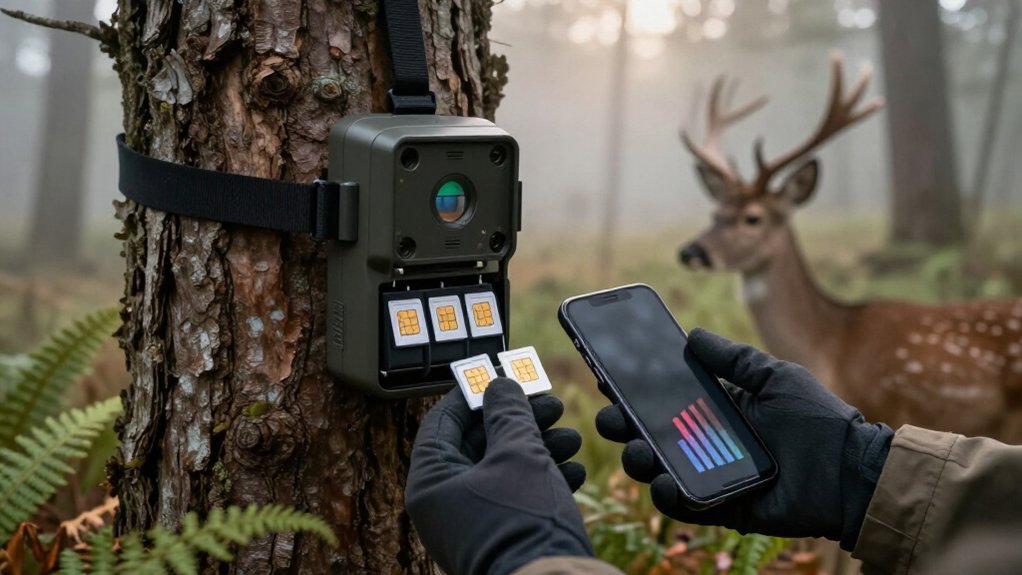
You can’t use any SIM card in a trail camera. You must verify that the camera is network-compatible or carrier-approved, its IMEI qualifies, and its LTE bands support the network at your site.
Use the required SIM size, activate a data plan permitted for the device, and enter the correct APN. Prepaid or postpaid plans may work, but roaming and data limits can stop uploads. Test photo delivery before mounting; key setup checks follow next.
Carrier-Locked SIMS May Fail
A carrier-locked trail camera may reject a SIM from another network even when the card is active and includes a data plan. You should confirm whether your camera is provisioned for AT&T, Verizon, or another carrier before ordering service. A lock can prevent registration on an unsupported network, so an otherwise valid data-only SIM won’t establish a usable connection. Data-only plans supply data; they don’t provide voice or SMS, which trail cameras generally don’t need for image transmission.
Some models don’t accept a removable SIM at all. They use an embedded SIM and require activation through the manufacturer’s app or approved service workflow. Follow maker activation instructions and applicable carrier terms. If marketed carrier-independent, verify it supports selected U.S. 4G LTE bands and technology.
Verify IMEI Carrier Compatibility
Before you buy a SIM, give the camera’s IMEI to the intended carrier and ask it to confirm that the device is permitted on its network. A network-approved camera isn’t automatically eligible everywhere; its radio hardware must meet the carrier’s approved LTE band and device-certification requirements. Confirm support for the carrier’s U.S. 4G LTE bands or compatible 5G bands where applicable. Also verify coverage at the exact installation site, since an approved IMEI doesn’t guarantee usable service there.
If the camera is carrier-locked, use service from its designated provider unless that carrier formally releases it. A different provider’s SIM may fit physically yet remain barred from registration. Ask whether the carrier accepts the camera’s IMEI for the selected data plan and whether restrictions apply.
APN Settings Can Block Activation
Even with a carrier-compatible SIM, your trail camera can’t establish mobile data service if its APN is missing or incorrect. The Access Point Name tells the device how to reach the carrier’s data network, so an otherwise approved SIM may not activate or transmit photos without the required value. Check your carrier’s or SIM provider’s official setup instructions, then enter the APN exactly as listed in the camera’s cellular settings.
Some current SpectrumSIM cards use “puffin,” while SpectrumSIM cards beginning 8946080 may require “data641003.” Don’t assume one SpectrumSIM profile applies to every card; verify the SIM-specific documentation. If your provider directs you to enable data roaming, turn it on in the camera. Before purchase, confirm your camera supports APN entry and compatible network bands.
Prepaid vs. Postpaid Plans
Prepaid plans lower upfront commitment and suit seasonal cameras, while postpaid plans can provide better data value for frequent uploads. You’ll need to track data caps, expirations, top-ups, and billing terms so remote transmissions don’t stop unexpectedly. Before activating either option, confirm carrier coverage, supported cellular bands, and whether your camera is not carrier-locked and plan-compatible.
Upfront Costs And Flexibility
Your SIM plan determines both the camera’s upfront cost and how easily you can adapt service to changing conditions. Prepaid service lets you fund a defined period, keeping seasonal deployments low-risk and avoiding a long commitment. Postpaid plans can provide stronger value for frequent captures, but you accept continuing carrier obligations.
| Option | Upfront feeling | Flexibility |
|---|---|---|
| Prepaid | Calm, controlled | Recharge or stop |
| Postpaid | Confident capacity | Ongoing commitment |
| Seasonal site | Relief | Activate when needed |
| Busy camera | Reassurance | Choose adequate service |
Confirm that your camera and carrier permit the selected SIM and plan type. If the app supports upgrades, downgrades, or pauses, you can respond without replacing hardware. Select a service that reflects motion activity, video use, and live viewing so uploads remain available without excess capacity.
Billing And Data Management
Once you’ve selected a compatible SIM and plan structure, manage billing and data against the camera’s actual transmission load. Prepaid service suits seasonal or occasional deployments: you purchase data when needed and avoid a continuous annual commitment. Monitor expiration rules, recharge deadlines, and account status, since an exhausted balance can stop image delivery.
Postpaid or contract plans can provide more data per dollar when your camera transmits heavily. Estimate usage from motion events, image resolution, clip length, live-view sessions, and repeated remote checks. Photo alerts typically consume far less data than video uploads; frequent clips or live viewing can justify a larger or unlimited allowance. Use the carrier portal or camera app to review balances, configure usage alerts, and recharge promptly. Keep billing records.
Coverage And Carrier Compatibility
Carrier compatibility determines whether a trail camera can register, transmit, and maintain a reliable data session at the installation site. Your camera must be carrier-agnostic, support the carrier’s 4G LTE bands, accept the SIM, and permit APN settings. Some models are carrier-locked or use built-in SIMs. Verify coverage at the location with carrier maps and a phone test; ridges, fields, and tree lines vary.
If coverage is uncertain, a Double Play data-only SIM can access AT&T and T-Mobile, while Triple Play adds Verizon. Choose prepaid for seasonal deployments or infrequent uploads; postpaid can cost less for high-volume, year-round use. Compare allowances, fees, and device terms before activation. Confirm the plan expressly permits camera or IoT use. Data-only SIMs don’t supply voice or SMS service.
Camera’s Supported LTE Bands
Check your trail camera’s U.S. 4G LTE band specifications before you buy a SIM, because a carrier-independent device won’t connect without compatible carrier bands. Compare those bands with the carrier’s network at the exact installation site, where coverage can change across ridges, fields, and tree lines. In remote areas, prioritize low-frequency coverage such as Band 17 when supported, and don’t assume a 5G SIM guarantees service.
Match Camera Band Specifications
Your trail camera’s LTE modem must support the bands and network technology used by the carrier at your installation site; a SIM card can’t overcome an incompatible modem. Check the manual or data sheet for the modem’s listed LTE bands, supported LTE category, and approved network profile.
In remote terrain, prioritize models with lower-frequency LTE bands, which generally provide longer reach and better penetration through trees, terrain, and structures. Also determine whether the camera is carrier-locked, carrier-certified, or marketed for a limited network, such as AT&T or Verizon.
A carrier-flexible camera may accept more SIM options, but only within its radio and firmware limits. Use the carrier’s coverage and device requirements to verify your planned installation remains supported under its activation and network policies.
Verify Carrier Band Compatibility
Band matching starts with the camera’s LTE specifications: compare its supported bands and network technology with the carrier’s bands at the installation site.
A SIM cannot enable a band the modem lacks. Confirm that the camera supports the carrier’s LTE technology and required bands; Band 17, for example, may support AT&T service but doesn’t guarantee operation on every AT&T camera or site.
You must also verify that the device is carrier-unrestricted or carrier-approved; matching bands don’t override a lock or activation policy. For a multi-network SIM, check every participating network’s bands: roaming access doesn’t supply absent hardware support. Review carrier coverage maps and test reception at the camera location, because ridges and tree cover can reduce usable signal despite a match during actual operation.
Consider Regional LTE Frequencies
Regional LTE frequencies determine whether your trail camera can use a carrier’s service at the installation site. Check the camera’s specifications for supported LTE bands and compare them with bands deployed by carriers in that region. A SIM card can’t create connectivity when the camera lacks a compatible band, even if the carrier reports nearby coverage. In remote locations, lower-frequency LTE spectrum can be decisive: AT&T Band 17, for example, generally reaches farther and handles trees or terrain better than higher-frequency bands.
Test the signal at the exact mounting point, not just the property address. Ridges, fields, and tree lines can change performance. If you use a carrier-independent camera, select a carrier or multi-network SIM only after confirming its available bands match the camera.
Deer Lease Photo-Alert Setup
Before deploying a photo-alert camera on a deer lease, test each supported carrier at the exact camera site, since LTE service can change sharply across ridges, fields, and tree lines. Verify that your camera is not carrier-locked and supports the selected carrier’s U.S. LTE bands; SIM compatibility depends on both device hardware and carrier approval. Activate a compatible data-only SIM and plan before installation, then enter the carrier APN when required.
Alerts use cellular data, not lease Wi-Fi. Size the plan for expected movement: frequent triggers consume more data, though still photos typically require less than video or live-view sessions. Send test images to the app, confirm delivery, and check the camera meter or carrier account regularly. Top up data before the camera stops reporting.
Roaming Can Disable Uploads
Even when your trail camera registers on a partner network, its SIM plan may prohibit roaming data and prevent photo or video uploads. Before installation, confirm that your carrier and plan explicitly authorize data roaming on networks available at the camera’s location. If the camera supports it, enable data roaming in its settings; some carrier provisioning instructions require that option for transmission.
Don’t rely on phone coverage: the camera’s roaming signal can be weak or unavailable. Test uploads at the deployment site. If delivery stops, review roaming policy, account status, and data permissions, then select a supported network or a SIM plan that provides authorized coverage there. Document results for compliance, especially where managed plans impose geographic, network, or usage restrictions on connected devices.
Cut SIMs Damage Weatherproof Seals
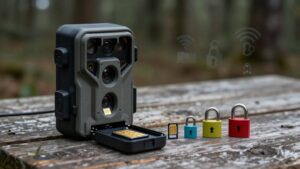
Use the SIM size specified by your trail camera, often a nano-SIM, and don’t cut a larger card to fit. A rough edge or plastic shard can jam the slot, interrupt carrier registration, and leave the card sitting high. That misfit can keep the compartment cover from closing flush, compromising the gasket’s weatherproof barrier.
- Choose a carrier-approved nano-SIM that matches the camera’s specified format.
- Seat it fully; don’t force the tray or contacts.
- Inspect the gasket for grit, tears, or displacement.
- Close the cover evenly and confirm every sealing surface sits flush.
A damaged seal can admit moisture, corrode contacts, and create intermittent service that resembles a carrier or plan fault. Keep the compartment clean; your camera’s environmental rating depends on SIM fit and seal integrity.
Test Uploads Before Deployment
Test the camera at its intended site with the installed SIM and active data plan before permanent mounting. Coverage can change between nearby ridges, fields, and tree lines. Verify network registration, carrier compatibility, and supported bands, then send a photo to your app or email. Review the carrier portal for delivery and usage. Test video or live view separately; weak signal and higher data consumption can expose plan limits.
| Check | Pass result | Compliance action |
|---|---|---|
| Registration | Supported network | Confirm SIM approval |
| Photo | Alert arrives | Record data use |
| Video | Stream completes | Verify plan allowance |
| Failure | Upload retries | Use antenna or compatible carrier |
Don’t permanently mount until uploads remain reliable. Use a supported external antenna, or test another compatible carrier before selecting the final location for deployment.
Conclusion
You can’t assume any SIM will work in your trail camera. Confirm the camera’s IMEI approval, supported LTE bands, carrier lock status, and required APN before activation.
Choose a plan that permits unattended IoT image uploads, including roaming where needed, and follow carrier terms. Don’t cut SIMs or compromise the weather seal. Before leaving your deer lease, send test photos and verify billing, signal, and upload reliability under actual coverage conditions at the deployment site.
Game Camera Range & Detail Calculator
Turn a game camera's MP, horizontal FOV and distance into frame width, pixels on the animal and the max range for your own detail minimum.
Which Trail Camera Do I Need? Use-Case Quiz
Five-question quiz that matches your use, signal, power and visits to a cellular, Wi-Fi or SD-card trail camera, with shelf matches.
Trail Camera Flash Type Selector
Answer three questions to rank no glow, low glow, infrared, white flash and color night vision trail cameras for your use.
Trail Camera Mount Height & Tilt Calculator
Turn your camera's mount height, aim-point height and distance into a tilt angle, line-of-sight distance and a printable setup card.
Trail Camera SD Card Size Calculator
Estimate how many days your trail camera SD card lasts and the smallest card size that covers the time between your camera visits.
Free Browser Trail Camera Photo Viewer
View SD card trail camera photos in your browser, sorted by EXIF capture time and grouped into events. Nothing is uploaded.
Trail Camera App & Firmware Finder
Find the official phone app for your trail camera brand, filter by connection and platform, and see how that brand updates firmware.