How Do Bird Feeder Cameras Identify Birds? AI Species ID Explained
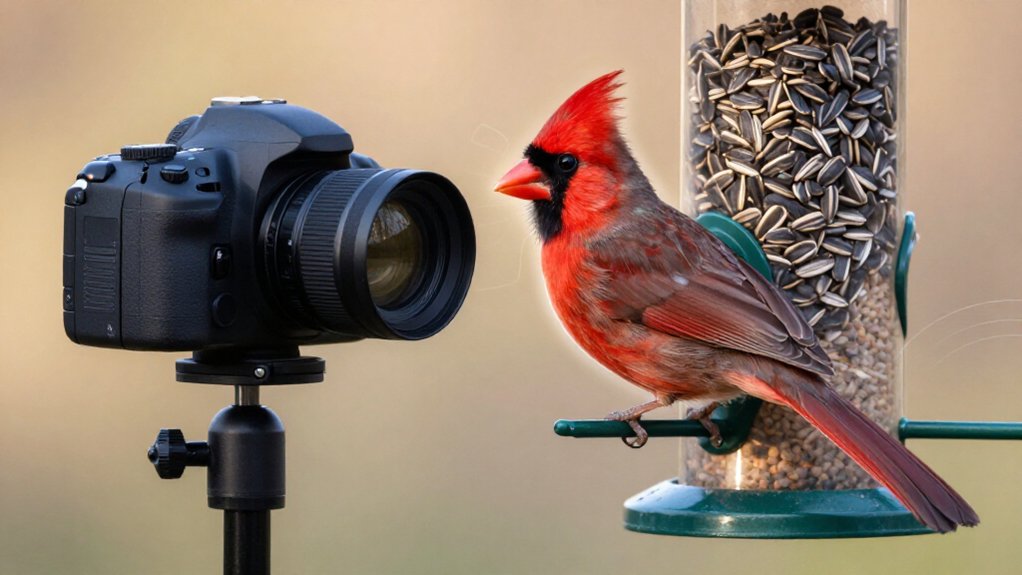
Your bird feeder camera uses motion-triggered computer vision to detect each visitor, isolate bird crops, and compare plumage, body shape, eye, beak, wing-bar, and head-pattern features with labeled species images.
Its AI ranks likely species and assigns confidence scores, either on the device or through cloud processing.
Sharp, well-lit views improve results; glare, blur, shadows, and juvenile plumage can cause errors.
It doesn’t use GPS.
You’ll see how detection, confidence filtering, and lens care refine identifications.
AI Matches Birds From Video
When a bird lands at the feeder, the camera captures an image or brief video frame and sends it through an AI identification pipeline. The system first evaluates whether the frame is useful: a bird should be visible, in focus, and oriented so diagnostic structures, such as the eye and beak, can be assessed. It then detects each bird, draws a bounding region around it, and crops that region for classification.
You’ll sometimes see several birds in one capture; some pipelines process roughly six individuals, including more than one species. The classifier ranks likely species and assigns confidence levels, or flags invalid detections. As you contribute labeled captures, retraining on millions of examples and thousands per species improves future identifications from your feeder images.
Plumage Patterns Drive Species ID
Rather than relying on color alone, feeder-camera models identify species by mapping plumage patterns: head markings, breast streaks, wing bars, tail edges, and other diagnostic configurations. When you submit a sharp image, the model compares the cropped bird with learned pattern templates built from thousands of labeled photographs; Bird Buddy, for example, uses at least 2,000 images per species.
Visible eyes and beaks strengthen this comparison because facial geometry and adjacent markings distinguish closely related taxa. A White-crowned Sparrow’s bold crown stripes provide evidence beyond the breast pattern and lines of similar sparrows. The system first retains images containing an in-focus bird, then isolates the bird before classification. If angle, blur, or obstruction conceals critical features, it can misclassify species whose plumage configurations overlap.
Motion Alerts Trigger Identification
A feeder camera doesn’t classify every second of video; it waits for motion or a bird-detected event to initiate a recording or image-capture sequence. When a bird lands, its movement triggers the alert, and the system examines incoming frames rather than assigning a species name to the entire scene. A detection model first locates each bird, separating it from feeder hardware, seed, leaves, or background motion. It can isolate several individuals in one frame, including birds representing different species.
The system crops each detected bird and evaluates the crop for diagnostic evidence before classification. Some cameras apply an “interesting” filter: your subject must be in frame, sharp, and show features such as an eye or beak. Only confident crops enter your species records.
On-Device vs. Cloud Identification
You can receive a species label quickly when on-device AI analyzes a feeder image locally, often before it reaches your app. Cloud identification uploads bird images or audio for server-based analysis, which can expand processing options but transmits your observations off-device. In either workflow, accurate identification depends on sharp views of diagnostic traits: such as the eye, beak, and plumage, and on the model’s training data and confidence threshold.
On-Device AI Processing
When a bird lands, feeder cameras typically detect it in the image stream, isolate a crop, and classify the species either on the device or through cloud processing.
With on-device AI, your camera performs some or all of that analysis internally. A compact model evaluates the cropped bird against learned visual patterns, such as bill shape, eye position, plumage contrast, wing bars, and body proportions. It can return an identification without requiring a network connection for the ID step.
You’ll usually receive fast results, but compact hardware limits model size and computational complexity. The camera may consequently reject soft, obscured, or poorly framed crops before assigning a species. Multi-stage confidence labels can mark a frame as useful, uninformative, or invalid, helping distinguish identifications.
Cloud-Based Species Identification
Cloud-based species identification shifts the computationally intensive classification step from the feeder camera to a remote server. When your camera detects a bird, it records the event, isolates the bird region, and uploads the image or clip. A server applies neural-network models, then returns the best-matching species profile.
| Stage | Cloud role | Species result |
|---|---|---|
| Detection | Receives cropped event | Bird region |
| Classification | Compares plumage and form | Best-match taxon |
| Cataloging | Stores observations | Visit history |
This workflow lets you use models as datasets grow. You see high, medium, or low confidence for identifications.
If the detector crops a leaf, shadow, or feeder component instead of a bird, the system can mark that phantom event invalid. Hybrid feeders trigger recording on your device, while cloud services classify and catalog species.
Privacy, Speed, And Accuracy
Choosing on-device or cloud identification determines how a feeder camera handles species data, response time, and privacy. With on-device inference, your camera classifies a landing-triggered image locally, so you receive a result quickly and avoid routine image uploads. Cloud processing sends images or video to remote servers, adding transmission delay but potentially applying larger or updated models that improve species discrimination.
Neither approach rescues poor evidence: identification is strongest when the bird is sharp, unobscured, and shows at least its eye and beak. Privacy-aware systems can remove irrelevant audio, including speech, before analysis or upload. When plumage, posture, or lighting leaves the model uncertain, you should see a confidence category or an unclassified/mystery visitor label in your observation records, not an invented species name.
Poor Lighting Reduces Accuracy
In low light, your camera adds image noise and loses the sharp eye and beak detail needed to distinguish similar species. Shadows can obscure plumage marks, while glare can wash out bill shape or head patterns. You’ll also get more motion blur at dawn and dusk, reducing classification confidence and increasing false detections.
Low-Light Image Noise
Poor lighting reduces a bird feeder camera’s identification accuracy because high ISO noise and slow-shutter blur obscure diagnostic features such as the eye, beak shape, and feather patterning. Your camera may reject these frames before classification when its detection pipeline can’t confirm an in-focus bird with visible eye and beak cues.
Even a 5-megapixel sensor can’t recover detail lost to noise, motion blur, compression, and limited dynamic range. As a result, the classifier receives unstable crops and may confuse closely related sparrows.
You can improve confidence by directing gentle, nonintrusive illumination at the feeder, which supports faster shutter speeds, cleaner detection, and more reliable species labels. Aim the light evenly, avoid glare, and retain natural behavior while recording sharper images consistently throughout feeding periods.
Shadowed Plumage Details
Shadowed plumage can hide the fine streaks, wing bars, and facial contrasts that separate similar species, especially sparrows. When your feeder camera records unevenly lit birds, its AI may not resolve the crown stripes of a White-crowned Sparrow or the crisp face pattern of a Song Sparrow. Dark areas also obscure eye shape and beak edges, features many classifiers use to rank species.
If the image lacks enough contrast, the system’s interesting-image filter may reject the frame before classification begins. You’ll get more reliable identifications when lighting reveals feather texture, wing bars, and facial markings across the whole bird, allowing the model to distinguish closely patterned taxa with greater confidence. This matters for Chipping, Field, and Tree Sparrows, whose head patterns are often subtle.
Glare And Motion Blur
Glare and motion blur can prevent a feeder camera from resolving the eye, beak, and head pattern needed to identify a species. Reflections from wet feathers, shiny seed hulls, or feeder surfaces can saturate pixels and erase diagnostic marks. Your camera may then misclassify the bird or create an invalid, phantom detection.
Low light also forces longer exposures. When chickadees, wrens, or other small songbirds dart to feed, their eyes and beaks smear, so the model cannot reliably locate, crop, and classify the subject. Many systems reject frames unless the bird is sharp, framed, and shows one eye plus the beak.
You’ll improve usable captures by providing bright light and positioning the feeder for contrast with minimal reflection; clear dawn/dusk light can yield species IDs.
Track Repeat Backyard Visitors
AI feeder cameras can continuously track repeat backyard visitors by detecting each landing, isolating the bird in the frame, and logging its species identification over time. Each recognized arrival can create a catalog entry, often linked to a visitor profile, letting you review returns by species across dates and, in favorable cases, distinguish the same individual. The log retains confidence scores and filters invalid or phantom detections, so you see reliable repeat records rather than uncertain classifications.
Identification improves because models train on millions of feeder photographs, including thousands of labeled examples for many common backyard species. You’ll obtain the strongest repeat-visitor history when images show a focused bird with its eye and beak visible. These features support accurate classification of returning feeder species.
Juvenile Birds Confuse AI
Juvenile birds often confuse feeder-camera classifiers because their transitional plumage can differ sharply from the adult patterns used to distinguish species. Your camera may capture a focused bird with visible eyes and bill, yet the model can still mislabel it. Young sparrows, finches, and blackbirds often show muted, streaked, or speckled feathers that resemble other species more than their own adults.
Similar head markings and eye patterns further weaken classification. Lighting, motion, and feeder angle can hide slight differences in bill profile, eye ring, or wing bars. When expected cues don’t align, the system lowers its confidence, assigns an invalid or phantom-like label, or saves the image as a mystery visitor. You can treat these records cautiously: juvenile plumage temporarily creates a species-identification challenge.
Species ID Isn’t GPS Tracking
A feeder camera identifies a bird’s species from visual evidence, not by following its GPS location. When you receive an identification, the system has analyzed pixels, not a satellite signal. Its computer vision workflow:
- Detects a bird and checks that it is present, in focus, and informative, often with an eye or beak visible.
- Crops detected subjects, allowing one image to label as many as six birds and up to four species.
- Classifies each crop against training examples, then reports an estimate with a confidence level.
You’re seeing a probability-based species assignment derived from plumage, body shape, bill form, and visible traits. Accuracy improves as developers train the model on thousands of examples per species, millions overall. It doesn’t reveal an individual bird’s movements.
Clean Your Camera Lens Weekly
Clean your feeder camera lens at least weekly to preserve the sharp eye, bill, plumage, and body-shape details needed for reliable species identification. Use a dry microfiber cloth and gentle lens solution; abrasive wiping can scratch 5-megapixel-style optics and soften diagnostic feather edges. Afterward, capture a bird at normal feeder distance. Confirm that it produces interesting, in-focus frames for detection, cropping, and classification.
| Condition | Action |
|---|---|
| Dust or pollen | Wipe before accumulation |
| Rain exposure | Dry promptly |
| Water spots | Remove gently |
| Soft test frame | Reclean and retest |
These checks reduce confusion between similar species, such as streaked sparrows or small finches, whose IDs depend on fine contrast and proportion. Don’t wait for visibly cloudy images: gradual contamination can lower confidence before you notice it clearly. This protects fine field marks across visits.
Conclusion
Bird feeder cameras identify species by comparing visible traits: plumage color, bill shape, body proportions, wing bars, posture, and behavior with trained image datasets. You’ll get the best results when your lens stays clean and illumination remains even. Motion detection starts analysis, but it doesn’t track a bird’s location.
Expect lower confidence for juveniles, molt, shadows, and look-alike species. On-device and cloud systems differ in speed and privacy, not in the biological evidence they evaluate.
Deer Feeder Timer & Hopper Runtime Calculator
Enter your feeder timer settings and your own measured feed rate to get lb per feeding, lb per day, days between refills and a printable schedule.