Do Cellular Trail Cameras Use More Battery? What Drains Them Fastest
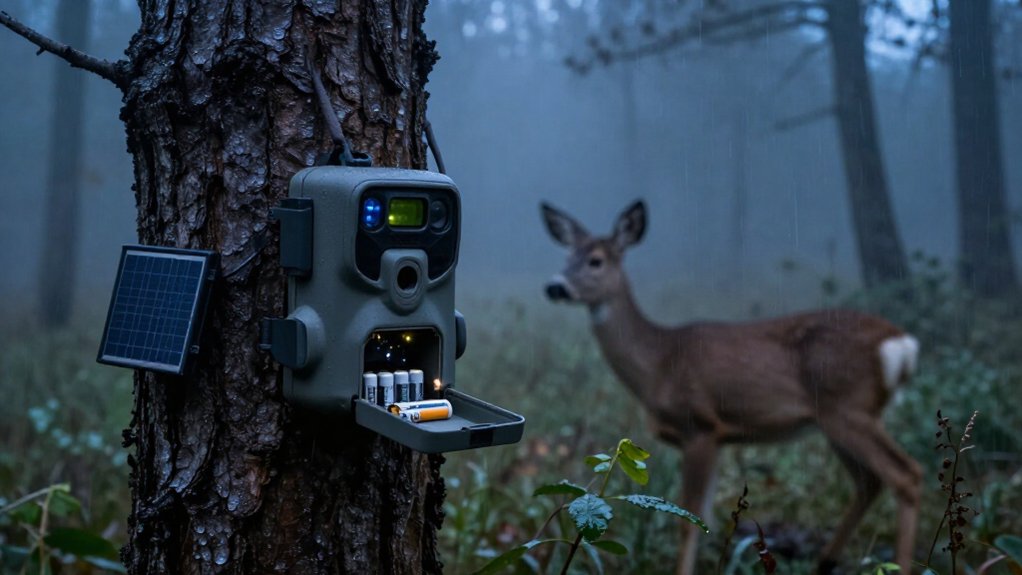
Yes, your Cellular Trail Camera typically uses more battery than an SD-only model because every upload powers the LTE modem for tower search, authentication, and transmission, often 30 to 90 seconds.
The fastest drains are frequent instant uploads, video, weak coverage, busy mineral-site triggers, and nighttime IR use.
Cold can cut alkaline capacity by about 50% and cause voltage sag.
Use lithium cells, photos, lower resolution, and a noon batch-upload window; next steps can extend runtime further.
Yes: Uploads Drain Batteries Faster
Yes: Cellular uploads drain trail-camera batteries far faster than local SD-card captures. When your camera triggers, it must power the 4G/LTE modem, scan for service, authenticate, connect, send the file, and receive confirmation. That sequence commonly lasts 30 to 90 seconds per upload. A non-cellular camera usually performs only 1 to 3 seconds of capture and SD-card writing, so frequent transmissions can become the dominant load on busy trails.
Your signal quality changes the result substantially. Weak or unstable coverage extends connection time and prompts retries, cutting runtime far below strong-signal estimates. Video costs more than still photos because larger files keep the radio transmitting longer; 10 to 15-second night clips are especially demanding. To reduce drain, limit immediate sends and batch images into one or two daily uploads.
Idle Modem Standby Draw
Even when no animal triggers your camera, its modem draws standby power to remain registered on the cellular network or periodically check for service. This idle load is far lower than transmission power, but it exceeds the microamp-level sleep draw of a non-cellular camera. Your camera may also wake its modem on a heartbeat schedule to verify coverage or maintain registration, so it cannot stay in its lowest-power state continuously.
You notice this baseline drain most in low-traffic locations, where the camera otherwise sleeps almost all day. Weak 4G coverage can raise it further: the modem spends extra time searching or reauthenticating even without an upload. Disable always-on or two-way features when you don’t need them; they keep the modem active longer between events.
Busy Mineral Sites Drain Faster
Busy mineral sites drain cellular trail-camera batteries quickly because frequent animal visits trigger repeated PIR wake-ups, image processing, storage, and uploads. You can see dozens to hundreds of daily triggers, unlike a low-traffic location. Every cycle consumes energy before connection: the PIR circuit wakes the processor, captures the frame, and writes it to storage. When prompt transmission is enabled, each event also makes the modem search for a tower, complete a handshake, and send data; that session commonly lasts 30 to 90 seconds.
Night activity strongly strains batteries: IR LEDs add high-current bursts, especially in cold conditions. Trim grass and remove moving vegetation to limit false triggers. Expect typical mineral-site deployments to last roughly 2 to 3 months on standard batteries, compared with 4 to 6 months at quieter sites.
Photo vs. Video Uploads
You’ll use less data and battery power with photos than with video, as video clips can cost 5 to 10× more energy per event. Longer videos increase processing, SD-card writes, and LTE transmission time, accelerating battery drain. You can further cut modem wake cycles by batching uploads instead of sending every capture immediately.
Photos Use Less Data
Photos use far less cellular data than video, so they place a substantially smaller load on your trail camera’s battery. Each transmitted image requires the modem to wake, connect, and send a compact file before returning to sleep. A video file carries more data, so its upload keeps power-hungry radio components active longer; one clip can use roughly 5 to 10 times the battery of one photo.
You can reduce photo-mode consumption by selecting a sensible image resolution. A 12MP image generally needs less sensor processing, SD-card writing, and cellular bandwidth than a 20MP image. If identifying animals doesn’t require maximum detail, lower resolution reduces the payload at every trigger. For cellular deployments where runtime matters most, configure photo-only capture and choose the lowest resolution that provides useful identification.
Video Length Drives Drain
Video changes the battery equation because each event keeps the camera working far longer than a still image. A single cellular video clip can consume roughly 5 to 10 times the energy of one photo. During recording, your camera keeps its image sensor active, writes continuously to the SD card, and, after dark, powers IR LEDs for the entire clip.
Duration matters directly: a 30-second clip holds those components on about three times as long as a 10-second clip. Higher resolution raises file size, too, forcing the 4G modem to remain in its high-draw transmission state longer. At night, recording and cellular delivery compound the load; an event can keep the camera awake for tens of seconds or more. Set 5 to 10-second clips and use needed resolution.
Upload Frequency Adds Load
Upload frequency can drain a cellular trail camera faster than capture itself: each immediate transmission wakes the LTE/4G modem for roughly 30 to 90 seconds, versus only 1 to 3 seconds to save an image to the SD card. Set immediate uploads only when you need real-time alerts. Every trigger creates another handshake, so 50 captures can mean 50 modem sessions. Photos use the least power; uploaded video commonly consumes 5 to 10× a photo because its larger file needs longer processing and airtime. Schedule one or two daily batches when monitoring isn’t urgent.
| Upload mode | Connection pattern | Battery load |
|---|---|---|
| Photo | Immediate | Lower |
| Video | Immediate | 5 to 10× higher |
If coverage is weak, connections last longer, so your savings from batching become even more important. Check app settings before leaving the site.
Cold Weather Cuts Battery Capacity
Cold slows battery chemistry, so your camera loses usable capacity and voltage can sag during high-current IR and LTE uploads.
Below freezing, alkaline AAs may lose about 50% of capacity, and 1.5 to 2.0A pulse loads can cause retries or shutdowns. Use compatible lithium AAs or 12V lithium packs for more reliable operation, often down to about -20°C.
Chemical Reactions Slow
When temperatures fall below freezing, battery chemistry slows and reduces both available voltage and usable capacity, so a cellular trail camera that runs for months in mild weather may last only weeks. You can lose roughly half an alkaline pack’s practical capacity in sub-zero conditions, even when the cells appear healthy at room temperature. Lithium cells retain reaction efficiency better, making them the safer winter choice. Check power before winter and replace weak packs early.
| Battery | Cold response | Practical action |
|---|---|---|
| Alkaline | Up to ~50% capacity loss | Replace before freeze |
| Lithium | Better low-temperature chemistry | Use for winter sets |
| Mild weather | Months possible | Establish baseline runtime |
| Deep cold | Weeks possible | Increase inspection frequency |
Keep spare batteries warm until installation; cold-soaked replacements start with less available energy.
Voltage Drops Under Load
A cellular trail camera can appear well powered at rest yet fail during a 1.5A to 2.0A modem or IR current spike: low temperatures raise internal resistance, causing alkaline AA voltage to sag below the camera’s operating threshold. Your battery indicator measures relatively light load, not the instant demand created when the camera wakes, illuminates IR, connects, and uploads.
In cold conditions, an alkaline pack may retain apparent charge but collapse near end-of-discharge during that pulse. The modem can retry a failed connection or the camera can reboot, spending additional energy each time.
Check behavior under real conditions: if you see intermittent uploads, resets, or sudden dead status despite a nonempty gauge, suspect voltage sag. Keep battery contacts clean and use a manufacturer-approved external power option.
Lithium Performs Better
Lithium AA batteries deliver the most reliable winter performance because they maintain steadier voltage and more usable capacity as temperatures fall. Unlike alkaline cells, which can lose up to roughly 50% of their effective capacity below freezing, lithium AAs keep supplying power when your camera needs short, heavy bursts. That matters when the modem and infrared LEDs fire together, often demanding about 1.5 to 2.0 amps. A lithium cell’s stable voltage reduces brownouts, failed uploads, repeated network connections, and premature shutdowns.
You get more battery energy, avoiding otherwise inaccessible cold-weather capacity. For a winter cellular deployment, install a matched set of fresh lithium AA cells. It’s one of the simplest upgrades you can make to extend runtime where cold weather causes the biggest losses.
South-Facing Solar Panel Setup
Mount the solar panel facing true south in the Northern Hemisphere, where it has an unobstructed view of the sun, to maximize daily charging time and stabilize battery recovery. Size the panel, battery, and charge controller for the camera’s standby load plus the 4G modem’s high-current transmit bursts.
In shade, tilt the panel for seasonal sun angles; a shallow tilt can leave uploads running on stored power during cold, cloudy, short days. At the camera’s exact mounting height, test signal strength and reposition it to reduce retry-heavy uploads. Clean dust and debris from the panel routinely, and inspect it after storms. Even partial shading can sharply cut output, preventing recharge while the camera still appears connected through its status indicator or app at all.
Lithium Battery Meters Can Misread
Don’t treat a cellular trail camera’s battery percentage as a true fuel gauge: many models estimate charge from voltage, and lithium cells hold a nearly flat voltage for most of their discharge cycle before dropping quickly near depletion.
| Symptom | What you should infer |
|---|---|
| 100% reading | Voltage, not stored energy |
| Night shutdown | IR and 4G sag voltage |
| Cold sag | Cutoff mismatch |
Your meter can remain near 100%, then fail when IR illumination and a 4G upload pull 1.5 to 2.0A. Cold temperatures and incompatible 1.5V rechargeable AAs worsen sag below cutoff. Test batteries under night transmission loads, not idle voltage. Choose cells or packs with warning curves designed for your camera; they provide earlier, more useful low-battery alerts. Log readings after uploads to predict replacement timing reliably.
Megapixels Don’t Improve Detection
Megapixels affect image detail, not detection: your camera’s PIR sensor triggers on changes in infrared energy and motion, so moving from 12MP to 20MP won’t extend its sensing range or make it fire more reliably. Resolution changes post-capture workload: larger files require more processor time, SD-card writes, and, when enabled, longer cellular modem airtime. Those costs are real, but they rarely dominate field battery use.
- Use 12MP if identification detail meets your needs; it won’t reduce PIR misses.
- Cut false triggers with careful aim and vegetation control.
- Increase photo delay to prevent repeated wake, capture, and transmission cycles.
- Limit video and IR-heavy nighttime captures first; these functions consume substantially more energy than a modest resolution increase.
Check SD capacity; storage doesn’t change detection either.
Schedule Noon Upload Windows
Schedule one daily upload window, often around noon, to stop your camera from waking its LTE modem after every trigger. Immediate uploads force a 4G connection to authenticate and transmit repeatedly, often for 30 to 90 seconds per session and longer when reception is weak. Configure your camera to batch images into one noon transmission, which cuts duplicate handshakes and session setup cycles.
At busy sites, dozens of daily instant uploads can reduce battery runtime to roughly two or three months. A fixed schedule limits modem activity and can extend practical runtime. If noon uploads fail, don’t leave the window open indefinitely. Instead, improve placement, raise the camera, or move it toward stronger coverage. Better signal reduces retries, modem on-time, and unnecessary battery drain at remote camera sites.
Conclusion
Cellular trail cameras use more battery than standard cameras because your modem draws power whenever it connects, uploads, or waits for service.
You’ll see the fastest drain at busy mineral sites, during video uploads, in cold weather, and where signal is weak. Reduce consumption by limiting video, scheduling noon transmission windows, using lithium batteries, and aiming a solar panel south. Don’t rely on battery meters, and don’t pay for megapixels that won’t improve detection.