Universal vs Model-Specific Trail Camera Security Box: Fit, Protection and Price
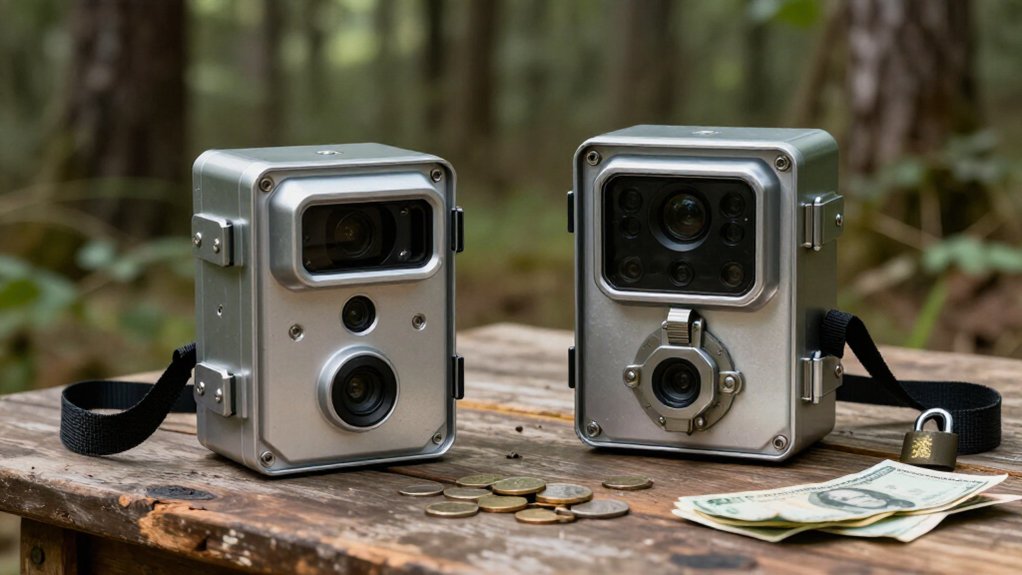
Choose a model-specific trail-camera security box when you want cutouts that align with your lens, PIR, flash, antenna, latch, and strap path. You’ll get a tighter fit and fewer pry gaps than with many universal boxes, improving theft deterrence on public land.
Universal options can cost less or fit older cameras, but verify depth, hinge clearance, mounting angle, and solar-panel space. Budget separately for a cable lock and padlock. Next, compare protection, checks, and costs.
Lock-Slot Access and Camera Ports
A security box only works if its lock slot and camera ports match your trail camera’s layout. Choose a model-specific box to align the lens, PIR sensor, flash, antenna, and latch cutouts. Verify the exact camera model before buying; a cheaper universal option can obstruct functions and waste money.
| Check | Why it matters | Smart move |
|---|---|---|
| Antenna opening | Keeps cellular and GPS signals available | Match built-in or high-gain antenna |
| Lock slot | Supports a padlock or Python cable | Budget for locks separately |
| Lock tab | Adds a second security point | Use cable and padlock |
Browning BTC-SB, BTC-SB-SM, BTC-SB-SM2, and BTC-SB-PS accept standard padlocks or Master Lock Python cables, yet locks aren’t included. Confirm cellular models have dedicated antenna cutouts; misalignment can weaken signal and raise replacement costs.
Cradle Design and Strap Routing
Cradle fit determines whether a security box protects your trail camera without compromising its view or mounting position. Model-specific boxes hold the camera closely, aligning the lens, PIR sensor, flash, antenna, latch, and strap path. That precise fit costs more, but it prevents blocked components and movement that can undermine security.
Before buying a universal box, verify your camera model number, not a generic “trail camera lock box” label. Compare cradle depth, cable cutouts, antenna opening, and strap layout with your camera, especially if it’s cellular; a blocked antenna can weaken signal. Also check how added bulk sits against the tree, since it may limit tight mounting angles. Don’t trust nylon strap alone: run a Python-style cable lock through box and around tree.
Bear-Resistance Under Direct Impact
While a standard model-specific steel box can protect your trail camera from bear bites and claws, don’t assume it will survive direct impacts. Browning’s model-specific boxes shield the housing and preserve camera function through placed lens, sensor, flash, antenna, and latch cutouts. That close fit matters: coverage is strongest when the camera can’t shift inside or leave vulnerable areas exposed.
These steel boxes aren’t described as bear-rated or tested for direct blows. At $24.99, or $29.99 for BTC-SB-C, they’re cost-conscious deterrents against bites and claws, not proof against a bear’s full-force strike.
In bear country, choose a purpose-built bear-rated case with heavier-gauge steel and recessed edges. No steel enclosure guarantees survival after every impact. Match protection to site risk; don’t treat an unspecified box as equivalent.
Padlock Threading and Tool Requirements
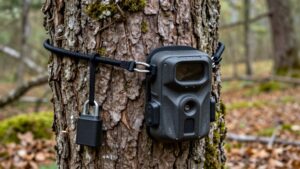
For a stronger theft deterrent, thread a Python-style cable lock through the security box and around the mounting tree, then close the box’s lock tab with a standard padlock.
Browning’s model-specific boxes include the lock tab, but you must buy the padlock separately. A Master Lock Python cable is a listed option, yet neither it nor a padlock comes with the box. Budget for both before choosing your setup.
Route the cable through the box, not just through your camera’s nylon strap; the strap alone won’t secure the box to the tree. Confirm the cable’s diameter fits the box’s openings and that your padlock shackle passes cleanly through the tab. Locks deter theft, but an angle grinder can still defeat them; they aren’t theft-proof.
Camera Depth and Hinge Clearance
A model-specific security box only protects your investment if the camera fits fully inside it. Before you buy, compare your camera’s depth with the box’s stated interior clearance. Product listings don’t always supply every measurement, so verify the dimensions rather than assuming a box made for your model will close correctly.
You also need enough room behind and around the body for the lid hinge to swing freely and latch securely. Check that lens, PIR sensor, flash, antenna, and latch cutouts align precisely. Misaligned openings can block detection, image capture, or access, while a tight fit can prevent closure. Finally, account for the box’s added depth at your chosen mounting point. Confirm it won’t interfere with the mount or force a poor camera angle.
Replacement Hardware and Resale
Replacement hardware only saves money when it preserves a secure, correct fit. Before you order a Browning replacement box, verify your exact camera model and the box’s compatibility. Lens, sensor, flash, antenna, and latch cutouts must line up; a near match can weaken protection or prevent use. Browning lists the BTC-SB, BTC-SB-SM, BTC-SB-SM2, and BTC-SB-PS at $24.99 MSRP, yet each serves specified camera models rather than every unit.
You’ll also need to budget for security hardware. They accept standard padlocks or Master Lock Python cables, but neither comes included. Check availability before replacement: BTC-SB is listed sold out, while the other three are unavailable. Ask seller or manufacturer directly before buying or reselling.
Solar Panel Clearance Constraints
Security doesn’t end with the box’s fit: added bulk can crowd a solar panel or prevent the camera from reaching the mounting angle that keeps the panel unobstructed.
Before you buy, compare the box’s exterior dimensions and placement against your camera and solar panel.
A model-specific box aligns cutouts for the lens, sensor, flash, antenna, and latch, but you should still verify clearance in your setup. For cellular cameras, confirm the antenna remains open while the panel has space. If the box crowds it, reposition the mount or choose a compatible box with sufficient clearance. This avoids paying for protection that compromises charging or signal reliability.
Powder-Coat Corrosion Resistance
You can’t assume a steel or camouflage security box has a corrosion-resistant powder coat. Check the exact universal or model-specific box for full powder-coat coverage and wet-condition testing before you buy. A durable finish protects your investment, preserves fit, and helps prevent rust from weakening security.
Powder-Coat Finish Durability
A powder-coat finish can help a steel trail camera security box resist corrosion by sealing the metal beneath a protective layer, which supports longer service life in wet or exposed locations. When you compare universal and model-specific boxes, treat finish durability as an unverified value factor, not a promised security upgrade. A close-fitting box may protect your camera better from tampering, but coating condition affects the box’s long-term strength and appearance. Before you pay more for a model-specific fit, inspect its finish and confirm care instructions.
Rust Prevention in Wet Conditions
Finish durability matters most when wet conditions expose chips, seams, and cutouts to standing moisture. Don’t assume the finish is rustproof; prevention protects your camera investment and avoids replacing a compromised box.
- Inspect chips and scratches after rain or seasonal checks.
- Clean and dry the box, especially seams, lock tabs, and cutouts.
- Touch up exposed steel with a suitable exterior metal coating.
- Keep coating clear of camera, antenna, and GPS openings.
A model-specific box can simplify cutout access, while universal fit requires closer checks around unused openings. Either way, unobstructed ports preserve function, and early touch-ups cost far less than rust-driven security failure later.
Public-Land Theft Risk
On public land, you face higher theft exposure, so don’t rely on your camera’s nylon strap alone. Choose a steel box fitted to your exact camera to prevent tampering and avoid blocking critical openings, including the antenna. Anchor it to the tree with a cable lock and padlock, budgeting for both since they typically aren’t included.
Higher Theft Exposure
Public-land cameras face higher theft exposure, so you’ll want more than the nylon mounting strap to protect your investment. A visible unit can disappear quickly, especially when a cellular camera and its ongoing data plan raise replacement costs. Build a practical public-land setup:
- Conceal the camera away from obvious trails.
- Use a model-specific steel security box.
- Run a Python-style cable lock around the tree.
- Add a padlock through the box’s lock tab.
This layered approach forces a thief to spend more time and effort, which can discourage opportunistic theft. It won’t defeat someone carrying an angle grinder, but it improves your odds. Budget accordingly: compatible Browning boxes typically list at $24.99, while CAMLOCKbox cases run about $20 to $49.95. Confirm availability before purchase.
Box Fit and Tampering
A model-specific steel box gives you the tightest defense because its cutouts align with the camera’s lens, PIR sensor, flash, latch, and antenna. That close fit limits exposed edges, blocks easy access to the latch, and prevents shifted placement from obstructing detection or images. Before you buy, match the box to your exact camera model number, not merely the brand.
Browning boxes, for instance, cover distinct model ranges, while cellular cameras require proper antenna and signal-access openings. A cheaper universal box can work, but only if it clears the antenna and fits your intended mounting angle without leaving pry-friendly gaps. On public land, any steel enclosure raises the time, noise, and effort needed to tamper with your camera. It still deters casual thieves.
Anchoring on Public Land
For public-land setups, anchor a fitted steel box to the tree with a cable lock and secure its lock tab with a padlock. Your camera’s nylon strap won’t stop a quick theft. Choose a box matched to your exact model, so its lens, PIR, flash, antenna, and latch openings stay usable.
- Thread a cable, such as a Master Lock Python, through the box and around a solid tree.
- Buy locks separately; Browning boxes described don’t include them, so budget accordingly.
- For cellular units, verify antenna alignment. BTC-SB-SM2 supports specified Browning cell-camera series and GPS signal access.
- Treat this setup as deterrence, not certainty: an angle grinder can still defeat steel. Place the unit higher, but keep legal access and serviceability in mind, too.
Verify Antenna and Lens Alignment
Before you buy a security box, match its lens, PIR sensor, flash, latch, and antenna cutouts to your camera’s exact model number. A near-fit can block the lens, weaken motion detection, interfere with flash coverage, or leave the latch inaccessible. For a cellular camera, confirm the antenna opening remains completely clear; steel over the antenna can reduce signal and undermine remote reporting.
Check fit in the mounting position you’ll actually use, since a box adds bulk and can change antenna clearance or camera aim. Model-specific boxes may carry a higher upfront price, but proper alignment protects your investment and avoids buying a replacement after failed photos or dropped connections. For example, Browning’s BTC-SB-SM2 has cellular and GPS openings for BTC-PSM/PSMX, BTC-4G-V, BTC-VP, BTC-RLDCP, and BTC-DWPS.
Conclusion
Choose a model-specific security box when you need tight camera fit, clear lens, antenna, solar, hinge, strap, and lock-slot access, plus stronger bear and theft resistance. Pick a universal box only if you confirm depth, port alignment, padlock threading, and tool clearance yourself. Don’t let a lower upfront price create exposed gaps or unusable controls. You’ll save more by matching the box to your camera, terrain, corrosion exposure, and public-land risk before you buy today.